
Mobile Print
With our Mobile Print Service, you can use your mobile device or personal computer to send documents to the library’s printers from anywhere. Simply submit documents for printing and come to the library to pick up them up during our normal business hours. Prints remain available for 48 hours.
How it works
1.) Send your documents to print using one of the four methods below.
2.) Come into the library within 48 of sending your documents. Click here to see our location and open hours.
3.) Pay for your prints.
4.) Staff will release the documents to the printer.
Print Pricing:
Black & White – $.10/page
Color – $.25/page
1.) Using email to send documents to library print system:
- Email from any device directly to the library’s print system at rhmlibrary-bw@ewprints.com (for black and white prints) or rhmlibrary-color@ewprints.com (for color prints).
- You may send just the mail itself for printing, or attach your documents to the email.
- Come to the Richmond Heights Memorial Library, and staff will print your items.
2.) Printing from tablet or smartphone app:
- Visit your device’s ‘store’ for apps. Install and launch the Princh App on your device.
- Open the file to print and click “Share”
- Select “Print with Princh”
- Switch to the Princh app
- Enter printer ID 106859
- Select “Memorial Library” printer
- Adjust print settings, as needed
- Accept Terms & Conditions
- Select Print
- Come to the Richmond Heights Memorial Library, and staff will print your items.
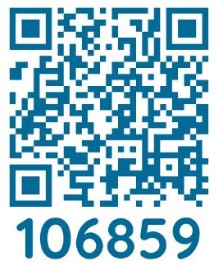
3.) Scan this QR Code:
- Scan QR code
- Select and upload file
- Click wrench icon to adjust print settings
- Accept Terms & Conditions
- Enter your email to ID your print when you pick them up
- Come to the Richmond Heights Memorial Library, and staff will print your items.
4.) Printing from tablet or smartphone Internet app:
- Begin by visiting https://print.princh.com/?pid=106859
- Select the file to upload
- Adjust print settings, as needed
- Accept Term & Conditions
- Come to the Richmond Heights Memorial Library, and staff will print your items.